Write in Obsidian, Publish on Your Own Site
- By Bruno Souza
- Personal tools
- 6 min read

On this page
If you already write in Obsidian, you are a few steps away from a blog of your own. One folder in the vault becomes the blog: every note you put in it becomes a page on the site as soon as you push the vault. The site comes from a free template for Astro, a site generator, used exactly as it ships, and it is hosted for free on Cloudflare. The full step-by-step is in the guide on the wiki.
What matters to me is the freedom to choose where I write. The best argument is simplicity: a single place, Obsidian, and the notes I pick become pages on the site. Nothing gets copied into another tool, and there is no second version of the text to fall out of date.
What the vault looks like
The vault gets two new folders: one for the blog and a hidden one for the site.
My vault/
├── journal/                 personal notes: they never leave here
├── drafts/                  work in progress
├── blog/                    what is here is on the site
│   ├── My First Post.md
│   ├── second-post.md
│   └── images/
│       ├── cover.jpg
│       └── photo.jpg
└── .site/                   the site (Obsidian does not show it)
The rule for the blog/ folder fits in one sentence: what is in it is on the site, and what is not in it is not on the site. To publish, you move the note from your drafts into blog/. To take it down, you move it out. There is no “published: yes” field you have to remember to set.
The .site/ folder holds the site template. Because its name starts with a dot, Obsidian does not show it, and it stays out of the way while you write. Inside it, the site sees the blog/ folder as if it were its own posts folder.
Images go in blog/images/. Just paste an image into the note: with a few Obsidian settings, it lands in that folder, and the link is written in a format the site understands.
The note’s name becomes the address
The site takes each page’s address from the file name:
| Note in the vault | Page on the site |
|---|---|
blog/My First Post.md |
/blog/my-first-post/ |
blog/second-post.md |
/blog/second-post/ |
Capitals become lowercase and spaces become hyphens. Accents stay in the address (Café Notes.md becomes /blog/café-notes/), so it is worth giving blog notes names without accents, or picking the address yourself with a slug property in the note.
The top of the note becomes the page
The template asks for three pieces of information in every post, and Obsidian shows them as properties at the top of the note:
---
title: My first post
description: Written in Obsidian, published on my site.
pubDate: 2026-10-14
heroImage: images/cover.jpg
---
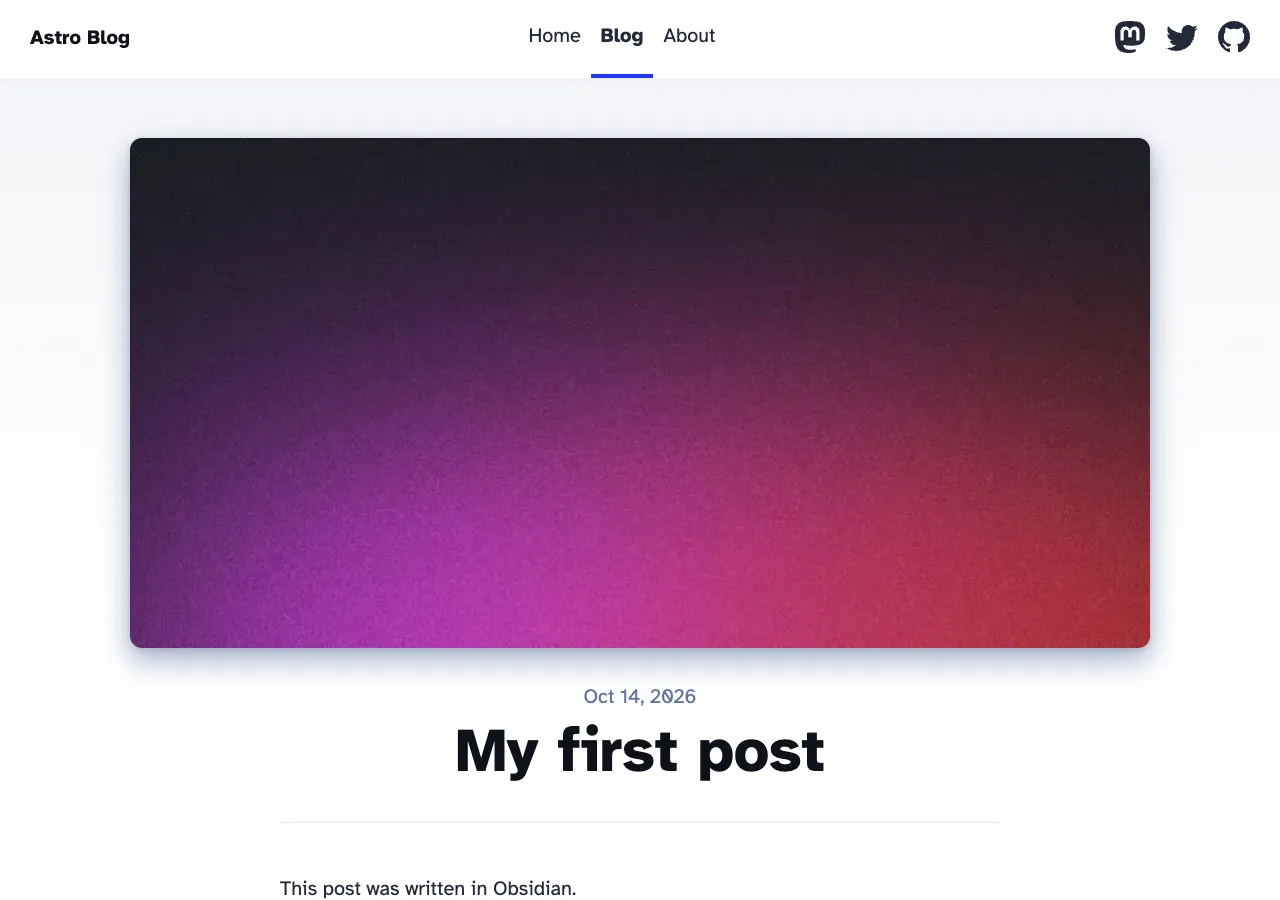
title is the page title, description is the summary shown in the list of posts, and pubDate is the publication date. heroImage, the cover image, is optional. With the Templates plugin, which ships with Obsidian, a new note starts with these properties filled in, and all that is left is to write.
The result, with the template as it ships:
Publishing is moving and pushing
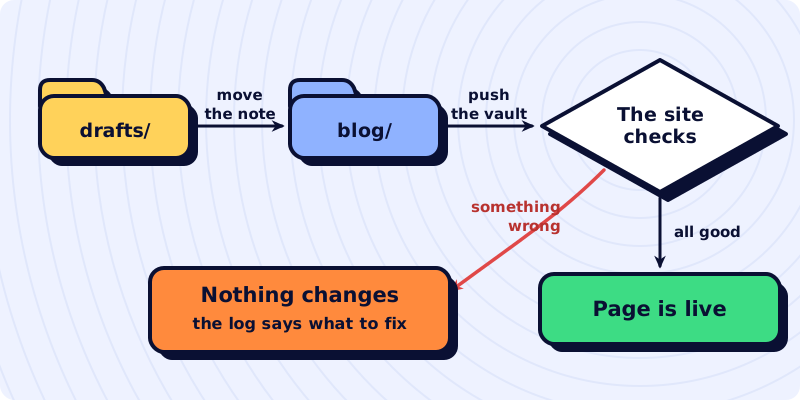
The vault is kept in a private repository on GitHub, a copy on the internet that also keeps the history of every change. Pushing the vault means sending your changes to that copy, with two clicks in GitHub Desktop or through a plugin inside Obsidian.
The push sets off an automation on GitHub. It downloads only the blog/ and .site/ folders, builds the site and sends it to Cloudflare. The rest of the vault stays where it is: the content of the other notes is never downloaded and never goes through the site. Day to day, the whole path comes down to this: I write in Obsidian, push, and the text is already on the site.
The site refuses what is wrong
Before publishing, the template checks every note in the folder. If something is wrong, the build stops and nothing goes live; the site that is already published stays as it was. It refuses, for example:
- a note without
title,descriptionorpubDate; - a date that is not a date (
pubDate: tomorrow); - an image referenced in the text that does not exist in the folder.
That cuts down what you have to remember before pushing. What the site does not check is up to you, and there are three things:
- Links between notes. A link to another note in the vault does not become a link to its page. To point to another post, use the site address:
/blog/second-post/. - Links in the
[[...]]format. It is Obsidian’s default format, and the site shows it as plain text. In Settings → Files and links, turn off Use [[Wikilinks]], and Obsidian starts creating links in Markdown format, which the site understands. This applies to pasted images too. - Plugins that build content on screen. Dataview, for example, builds lists and tables by querying other notes, but only while Obsidian is open. In the file, the query is a code block, and that is what the site would show.
What it costs
| Piece | Price |
|---|---|
| Obsidian | free, including for commercial use |
| Astro blog template | free |
| Private repository on GitHub | free |
| Automation (GitHub Actions) | 2,000 free minutes a month on private repositories |
| Hosting on Cloudflare | free: requests for static files are neither billed nor limited |
| Address | free at my-blog.your-account.workers.dev; your own domain is optional and paid for separately |
For comparison: Obsidian Publish, Obsidian’s own service for turning notes into a site, costs $8 per site per month on the annual plan, or $10 month to month. It does everything in fewer steps. The path in this post takes a one-time setup and gives you a site that is yours, from the code to the hosting: you keep writing where you chose, and no service decides what your blog is like.
Where to start
The guide on the wiki does all of this from scratch: installing and setting up Obsidian, downloading the Astro template and connecting it to the blog/ folder, putting the site on Cloudflare and making every push publish on its own. Start with Obsidian: create the blog/ folder and write the first note with the three properties.