Dead Letter Channel in Mule: the Anypoint MQ dead letter queue
- 11 min read

On this page
- The invoice message that must neither vanish nor come back forever
- In the book, the messaging system moves the message out of the way
- The pattern’s sketch
- In Anypoint MQ, the DLQ belongs to the queue and the flow only answers ACK or NACK
- The DLQ lives in the queue configuration
- What the consumer handles: ACK or NACK
- The message’s path with the DLQ
- Dead Letter Channel or Invalid Message Channel
- Things to watch with the DLQ
- When the DLQ does not help
This page is for developers who consume Anypoint MQ queues in a Mule flow and need to decide where a message that keeps failing ends up. It shows the Dead Letter Channel pattern, how the Anypoint MQ dead letter queue (DLQ) implements it, and what is left to the broker and what is left to the application. The scenario is the series one: an order that goes through payment, inventory and invoicing.
The invoice message that must neither vanish nor come back forever
The book Enterprise Integration Patterns starts from a question: what does the messaging system do with a message it cannot deliver (Dead Letter Channel)?
In the order scenario, the invoice consumer reads the order-created event and calculates the taxes before issuing the invoice. With the tax service down, it cannot process the message.
The two obvious ways out are both bad. If the consumer acknowledges and moves on, the order is lost: the invoice never goes out, and nobody finds out. Returning the message to the queue with no limit makes the consumer try the same message again and again, until the messages’ time to live (TTL), configured on the queue, runs out and Anypoint MQ deletes it (queues). The message has to get out of the way and still be kept somewhere.
In the book, the messaging system moves the message out of the way
When the messaging system determines that it cannot or should not deliver a message, it may move it to a Dead Letter Channel. The book warns that how this channel works depends on each messaging system’s implementation, if it has one, and that the channel also goes by the name dead message queue or dead letter queue (DLQ). When moving the message, the system may record the channel on which it should have been delivered (Dead Letter Channel). The messaging system moves the message, not the receiver, and that is what sets this pattern apart from the Invalid Message Channel, further down.
The pattern’s sketch
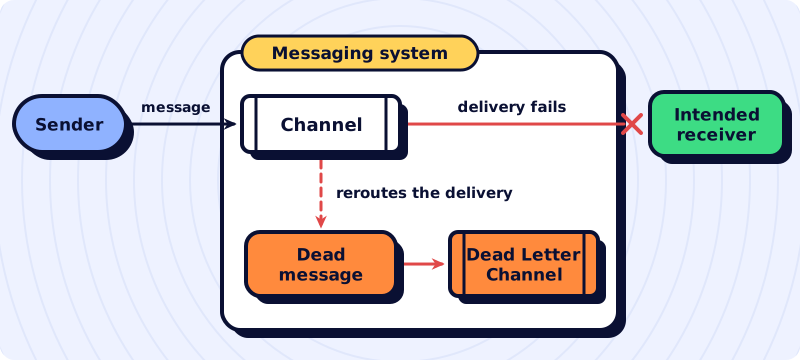
The diagram redraws the sketch on the pattern’s page and shows who moves the message out of the way: the sender sends through the channel, delivery to the intended receiver fails, and the messaging system reroutes the dead message to the Dead Letter Channel.
In Anypoint MQ, the DLQ belongs to the queue and the flow only answers ACK or NACK
In Anypoint MQ, a DLQ is an ordinary queue that only receives undelivered messages. It is assigned in the source queue’s configuration, and the broker is what moves the message (queues). In this design, the Mule application does not write to the DLQ: it only decides whether to acknowledge (ACK) or not acknowledge (NACK) each message.
The bridge to the book is in the counting. In Anypoint MQ, a NACK counts as an unsuccessful delivery attempt, and the flowchart in the documentation returns every unacknowledged delivery to the queue and checks the attempt limit before moving the message to the DLQ (queues). So the message the consumer cannot process is, to the broker, what the book calls a message that cannot be delivered.
That is why this page has no runnable example in the mulesoft-patterns-examples repository: the configuration and the flow below follow the documentation and need an Anypoint MQ broker.
The DLQ lives in the queue configuration
In Anypoint Platform > MQ > Destinations, the configuration takes two steps (queues):
- First create the queue that will serve as the DLQ,
order-created-invoice-dlq. It must be the same type as the source queue (standard or FIFO), be in the same region and environment, and belong to the same account. - On the invoice queue,
order-created-invoice, turn on Assign a Dead Letter Queue, chooseorder-created-invoice-dlqin Dead Letter Queue Name and, if you want, adjust Delivery attempts before reroute: how many times Anypoint MQ tries to deliver the message before moving it to the DLQ. The default is 10, and the value ranges from 1 to 1000.
The Anypoint MQ Admin API also creates and manages queues (Anypoint MQ APIs). In the configuration it returns, the invoice queue looks like this (excerpt):
{
  "type": "queue",
  "queueId": "order-created-invoice",
  "fifo": false,
  "maxDeliveries": 10,
  "deadLetterQueueId": "order-created-invoice-dlq"
}
And the DLQ now lists its source queues in the deadLetterSources field (queues):
{
  "type": "queue",
  "queueId": "order-created-invoice-dlq",
  "deadLetterSources": ["order-created-invoice"]
}
Do not confuse Delivery attempts before reroute with the connector’s Max Redelivery Count on the Redelivery tab: that one is a parameter of Mule’s redelivery policy, which throws MULE:REDELIVERY_EXHAUSTED when the same message goes past the limit of redeliveries to the flow (queues, redelivery policy).
What the consumer handles: ACK or NACK
The connector’s Subscriber uses the AUTO acknowledgment mode by default: it sends the ACK, which removes the message from the queue, only if the flow finishes without an error. If the flow ends with a propagated error, the message gets a NACK and goes back to the queue. If the flow does not finish within acknowledgementTimeout (two minutes, when not configured), it also goes back (Subscriber, ACK and NACK). The Subscriber also uses the prefetch strategy by default, which keeps messages in a local buffer; with it, Anypoint MQ tries to honor acknowledgementTimeout, but extends the deadline of a message that spends 80% of it in the buffer, and the documentation recommends not using prefetch when the deadline must be honored (Subscriber, ACK and NACK).
The other two modes change this count. In MANUAL, the flow itself calls the ACK or NACK operations with the message’s ackToken. In IMMEDIATE, the message is acknowledged and removed from the queue before processing and does not come back if processing fails. To avoid losing messages in this mode, the documentation recommends a DLQ (ACK and NACK), but the broker has nothing left to move: the message has already left the queue, and publishing it to the DLQ would fall to the flow itself, in its error handling.
With the default mode, the consumer looks like this; issue-invoice is the flow that calls the tax service and issues the invoice.
<!-- Reference configuration -->
<!-- ${secure::...} requires a <secure-properties:config> in the application -->
<anypoint-mq:config name="Anypoint_MQ_Config">
  <anypoint-mq:connection url="${anypoint.mq.url}"
    clientId="${anypoint.mq.clientId}"
    clientSecret="${secure::anypoint.mq.clientSecret}"/>
</anypoint-mq:config>

<flow name="invoice-consumer">
  <anypoint-mq:subscriber config-ref="Anypoint_MQ_Config" destination="order-created-invoice"/>
  <flow-ref name="issue-invoice"/>
  <error-handler>
    <on-error-propagate type="ANY">
      <logger level="WARN" message="#['Invoice not issued; the message goes back to the queue. correlationId: ' ++ correlationId]"/>
    </on-error-propagate>
  </error-handler>
</flow>
The on-error-propagate only logs the failure; it is the propagated error that makes the Subscriber answer with a NACK (On Error Propagate). No line sends the message to the DLQ: the broker counts the attempts and moves the message.
The message’s path with the DLQ
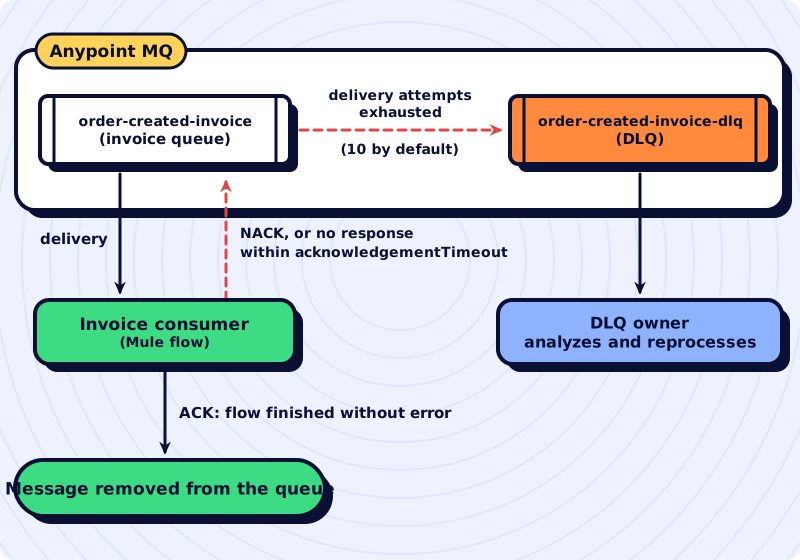
The diagram shows what the application decides and what the broker then does with a message from the invoice queue.
Dead Letter Channel or Invalid Message Channel
The book has a neighboring pattern for a different problem: the message that arrives but makes no sense to the receiver. In the Invalid Message Channel, the receiver itself moves the message to a special channel for messages it could not process (Invalid Message Channel).
An order without the customer’s tax ID (CPF or CNPJ in Brazil) will fail all 10 attempts the same way and reach the DLQ mixed in with the orders that failed only because the tax service was down. When the flow knows the message will never be valid, it sends it to a separate queue itself:
<!-- Reference configuration -->
<flow name="invoice-consumer">
  <anypoint-mq:subscriber config-ref="Anypoint_MQ_Config" destination="order-created-invoice"/>
  <choice>
    <when expression="#[isEmpty(payload.customer.taxId)]">
      <raise-error type="INVOICE:INVALID_ORDER" description="Order without the customer's tax ID"/>
    </when>
  </choice>
  <flow-ref name="issue-invoice"/>
  <error-handler>
    <on-error-continue type="INVOICE:INVALID_ORDER">
      <anypoint-mq:publish config-ref="Anypoint_MQ_Config" destination="order-created-invoice-invalid"/>
    </on-error-continue>
    <on-error-propagate type="ANY">
      <logger level="WARN" message="#['Invoice not issued; the message goes back to the queue. correlationId: ' ++ correlationId]"/>
    </on-error-propagate>
  </error-handler>
</flow>
The on-error-continue makes the flow end as if it had succeeded (On Error Continue), and so AUTO mode acknowledges the message on the invoice queue after it has been published to order-created-invoice-invalid (Raise Error, Publish). The invalid-message queue is kept apart from the DLQ because the cause is different: from the DLQ, the message can go back to the queue once the tax service recovers; in the invalid-message queue, the order has to be fixed at the source, because resending it as it is would produce the same error.
Things to watch with the DLQ
- FIFO and a DLQ do not guarantee order. The DLQ of a FIFO queue must be FIFO, and even so the order is lost: the message that goes to the DLQ leaves the queue, and the next ones are processed without it. If order must be strict, the documentation says not to assign a DLQ to the FIFO queue (queues).
- The DLQ needs an owner and a way back. Messages in the DLQ are there to find out why they were not delivered, and to recover them, the documentation points to the REST API: read from the DLQ and write to a queue (queues). Someone has to know that the DLQ has received messages and have a procedure to send them back after fixing the cause.
- Looking at the source queue uses up attempts. On a queue with a DLQ, viewing messages in the Message Browser counts as a delivery, and returning them to the queue counts as a NACK, an unsuccessful attempt (queues).
- The DLQ has a TTL too. As with any queue, the message TTL (Message TTL), configured on the queue, goes up to two weeks (queues). In a DLQ nobody looks at, the message is deleted when the DLQ’s TTL runs out.
- A tax service outage sends valid messages to the DLQ. With the service down, every message fails and may exhaust its attempts. For this case there is the Subscriber’s circuit breaker, off by default and configured with
<anypoint-mq:circuit-breaker>: aftererrorsThresholdconsecutive errors, it stops consuming fortripTimeout. It reduces the attempts used up, but does not eliminate them. With the circuit open, messages already consumed get a NACK and go back to the queue; aftertripTimeout, a single message tests the service and, if it fails, the circuit opens again (Subscriber). Since each NACK counts as an unsuccessful attempt (queues), the inference is that these NACKs and the failed test messages also use up attempts. - Reprocessing calls for an idempotent receiver. Standard queues deliver at least once, and sometimes more than once (queues). A message coming back from the DLQ may find part of the work already done, and the consumer has to produce the same effect whether it receives the message once or twice, as the idempotent receiver page shows.
When the DLQ does not help
The DLQ exists because there is a queue between the sender and the processor. By the same reasoning, it is no use to a flow with an HTTP Listener, where there is no queue between the caller and the flow: the caller is waiting for the response, and the error goes back to it immediately, with the status and body the API contract defines. There is no stored message for the broker to move, and resending the request is the caller’s decision.
Nor does the DLQ replace handling an error the flow knows how to resolve. A message that will never be valid goes to the invalid-message queue. A brief failure, which a new attempt right afterwards would fix, can be retried within the flow itself with Until Successful before the error is propagated. The attempts, added up, have to fit within acknowledgementTimeout: if the deadline runs out while the flow is still trying, the message goes back to the queue and can be delivered again, to this or another consumer, while the first execution carries on (ACK and NACK), and that return uses up a delivery attempt (queues). The DLQ is for what is left after that: the message the consumer tried to process and could not, and that someone will need to look at.
The other patterns in the series, with the Mule component that implements each one, are in the catalog of integration patterns in Mule.